Overview
Arranger is a versatile, model-agnostic data discovery API for OpenSearch and Elasticsearch, designed to simplify building search interfaces for complex datasets. A React component library is available for generating interactive search UIs.
Arranger supports OpenSearch 1.x or higher and Elasticsearch 7.x (minimum 7.0, licensed/default distribution only; ES OSS and ES 8.x are not supported; the bundled client is @elastic/elasticsearch v7).
OpenSearch maintains API compatibility with Elasticsearch 7.x, so query syntax and conventions documented here apply to both engines.
Key Features
- Configurable Search UI: Provides a suite of customizable search interface components based on Elasticsearch index mappings, easily tailored to fit specific data structures and user needs without extensive manual coding.
- GraphQL API: Arranger Server generates a GraphQL API from Elasticsearch mappings, offering:
- Efficient data retrieval
- Adaptable structure
- SQON integration for human-readable and machine-processable search queries
- Model-Agnostic: Works with any properly structured OpenSearch or Elasticsearch index.
- Integration-Ready: The search API integrates with any web front end; a React component library is included for building search UIs.
System Architecture
Arranger integrates with your OpenSearch or Elasticsearch cluster to generate a search API from your configured index mapping. It consists of two main modules:
-
Arranger Server: The back-end search API service that:
- Generates a GraphQL API from Elasticsearch mappings
- Acts as middleware between the UI and Elasticsearch
- Simplifies querying and filtering using Serializable Query Object Notation (SQON)
- Provides an intermediary layer to avoid direct interaction with complex Elasticsearch queries
-
Arranger Components: A library of React components for building interactive search UIs, communicating with Arranger Server to fetch and display data.

As part of the larger Overture.bio software suite, Arranger typically integrates with other services:
- Elasticsearch: The underlying search and analytics engine (created and maintained by Elastic) that Arranger interfaces with to provide powerful search capabilities.
- Stage: The React-based web portal scaffolding that provides the overall structure and layout, within which Arranger components are rendered to create a cohesive and interactive data exploration interface.
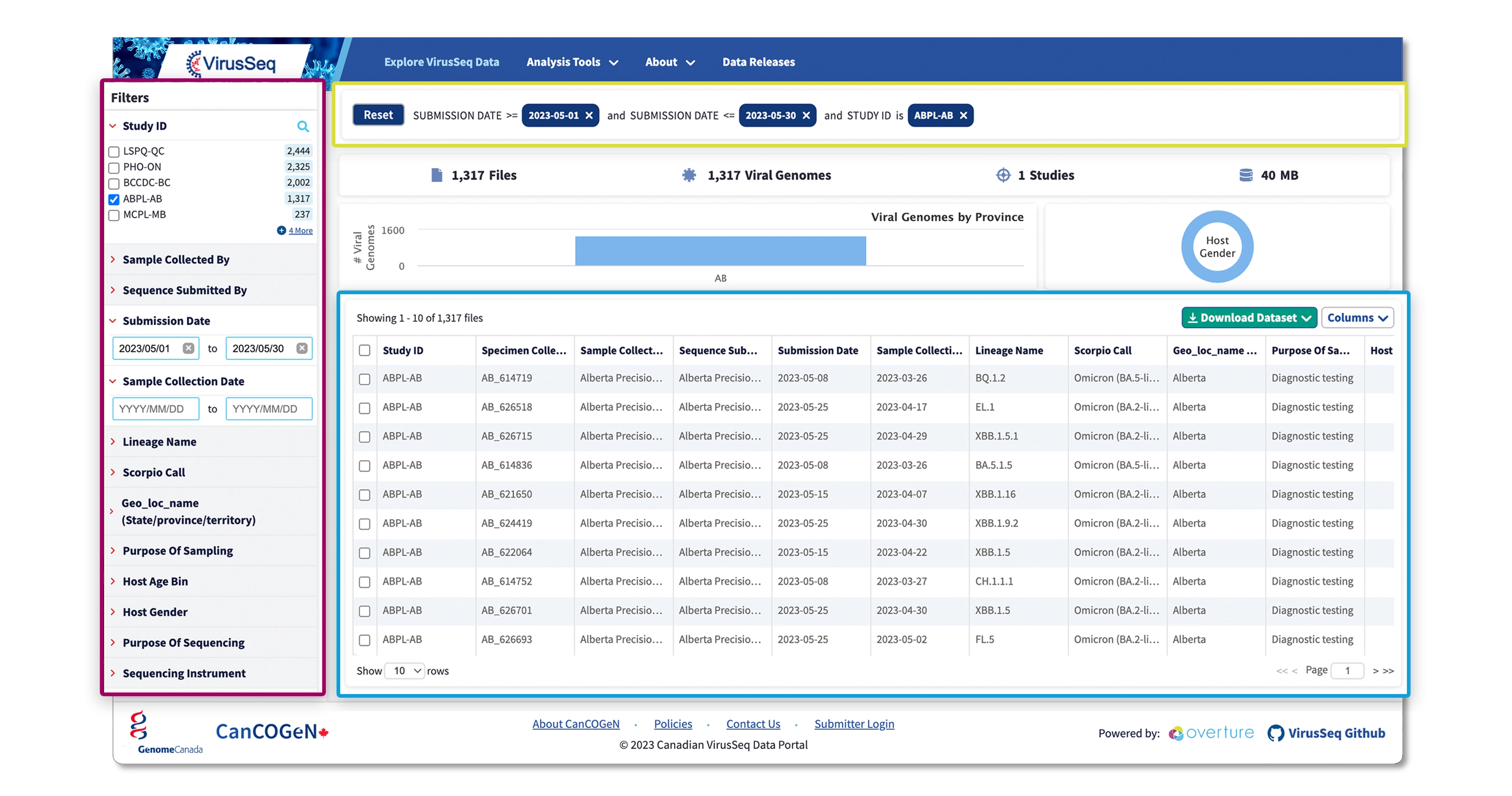
The Arranger Components image above highlights three key features:
- Faceted Search (Red): Allow users to filter data using multiple dimensions.
- Data Tables (Blue): Display search results in a customizable, interactive table format.
- SQON Viewers (Yellow): Visualize and manage complex search queries.
Repository Structure
The Arranger repository can be accessed from our Overture-Stack GitHub page located here.
arranger/
├── apps/
│   ├── mcp-server/
│   └── search-server/
├── docker/
├── integration-tests/
│   └── server/
├── modules/
│   ├── admin-ui/
│   ├── charts/
│   ├── components/
│   ├── graphql-router/
│   ├── sqon/
│   └── types/
└── scripts/
apps/: Runnable server applications:search-server/: The Arranger search server: a GraphQL service that interfaces with OpenSearch/Elasticsearch and hosts the configuration API.mcp-server/: An MCP (Model Context Protocol) server that exposes Arranger introspection as tools and resources for AI agents.
docker/: Dockerfiles and supporting configuration for building and running Arranger services locally and in CI.docs/: Markdown files that contain instructions on how to use Arranger and its capabilities, contribution guidelines, etc.integration-tests/: Full-stack integration test suites that run against a live Elasticsearch instance.modules/: Shared library packages:admin-ui/: (Inactive) Administration interface: not under active development; a replacement is planned.charts/: Chart visualizations library for Arranger-powered data portals.components/: React components to streamline integration of search portals with an Arranger server.graphql-router/: Core GraphQL routing logic: schema generation, query handling, and introspection endpoints.sqon/: SQON parsing and validation utilities.types/: Shared TypeScript types and configuration constants used across modules and apps.
scripts/: Utility scripts for development, deployment, and system management.
Where to go from here
Different roles interact with Arranger differently. Pick the path that matches your goal.
Deploying Arranger for the first time
You need a running server connected to your search engine, with at least one catalogue configured.
- Concepts: the domain model: catalogues, facets, buckets, SQONs
- Setup: prerequisites, environment variables, search engine permissions
- Index mappings: what your ES/OS index mapping drives in Arranger
- Catalogue configuration: the four JSON files that define each catalogue
- Feature flags: security hardening flags to review before going to production
Building a search interface
You're implementing a data portal using Arranger Components or writing UI code that queries Arranger.
- Concepts: understand catalogues, facets, and SQONs before writing code
- Catalogue configuration: configure which fields are visible and facetable
- Query processing: how a user action becomes an Elasticsearch query
- Building SQON queries: the
SqonBuilderAPI andaddFilterClause
Querying Arranger programmatically
You're building an API client, pipeline, or script that sends queries to Arranger.
- Query processing: the SQON to GraphQL to ES pipeline
- Building SQON queries: constructing valid SQONs in TypeScript
- SQONs in detail: operator reference, aliases, pivot, edge cases
- Introspection API: discover available fields and operators at runtime
Integrating AI or automation
You're connecting an AI model, MCP client, or automated pipeline to Arranger.
- AI and automation: MCP server setup, available tools, SQON generation rules
- Introspection API: the live source of truth for field metadata
Upgrading from 3.0.x or consolidating instances
- Migrating to 3.1: breaking changes (env var renames, image rename, multicatalogue layout)
- Consolidating multiple instances: step-by-step guide to the multicatalogue directory layout